![fidesic-logo-300px-2023-2.png]](https://help.fidesic.com/hs-fs/hubfs/fidesic-logo-300px-2023-2.png?height=40&name=fidesic-logo-300px-2023-2.png)
By default, PO match flags Price Variance on any invoice line whose price differs from its PO line, even by a cent. PO match tolerances let you allow a small difference instead, per line and across the whole invoice, and give a vendor its own values where it needs them.
A tolerance doesn't approve anything on its own. It decides whether a line counts as matched, so an approval rule that acts on a Full Match can fire.
Who can do this: users whose role has Manage Company Profile set the company's tolerances. Users whose role has Edit Vendors set a vendor's own. Your company must have Enable Purchase Order functionality turned on.
Setting your company's tolerances
- Go to Settings → Company → Preferences, and open Purchase Orders.
- Under PO match tolerances, choose a setting for each item below. Each one saves as you change it.
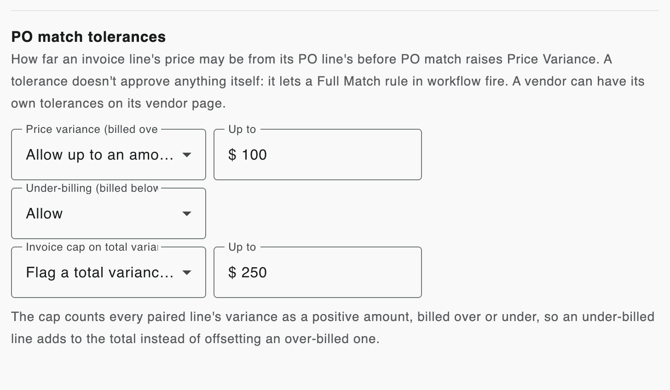
Price variance (billed over the PO price)
- Flag any difference: the default. Any price difference is flagged, as before.
- Allow up to an amount per line: a line may be over by up to this many dollars.
- Allow up to a % of the line: a line may be over by up to this percentage of the line.
- Allow within an amount and a %: a line must be within both.
Under-billing (billed below the PO price)
This setting appears once price variance is set to a tolerance. Allow, the default, lets a line billed below the PO price through. You can instead flag any difference, or allow it up to an amount, a percentage or both, with the same choices as price variance.
Invoice cap on total variance
Off by default. Choose Flag a total variance over an amount to flag an invoice whose lines are each within tolerance but add up to too much. The cap counts every line's variance as a positive amount, billed over or under, so an under-billed line adds to the total instead of offsetting an over-billed one.
Charges not on PO
If you use invoice charges, the same section holds the Charges not on PO settings for freight, misc and tax. See Enter freight, misc and trade discount as invoice charges.
Applying a change to invoices already waiting
After you save a tolerance, Fidesic asks Apply to unapproved invoices? Click Regenerate to run workflow again on your unapproved invoices, so they're judged against the new tolerance. This resets approvals already given on them, so you're asked to confirm. Choose not to, and the new tolerance applies to invoices from the next time their workflow runs.
Giving a vendor its own tolerances
- Open the vendor, and on the Vendor Details tab click to edit it.
- Under PO Match Tolerances, each setting reads Use company setting, followed by what the company setting is. Pick a different value for any setting this vendor needs.
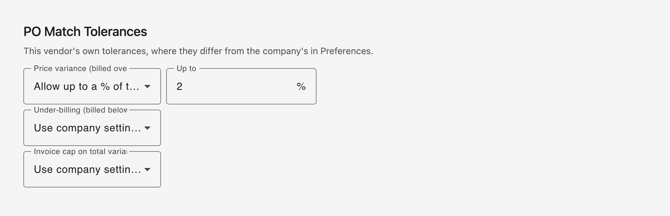
A vendor can override price variance, under-billing, the invoice cap, and freight, misc and tax not on PO. Its values are saved separately from the rest of the vendor, so a vendor sync from your accounting system doesn't overwrite them. Freight Expected on PO also lives in this section: when it's on, this vendor's freight is flagged whenever the PO doesn't carry it, whatever the tolerances allow.
What you see on the invoice
- Each PO line's price label shows the verdict: green when within tolerance, such as Price +$40.00 over (within $100.00), red when billed over past it, and yellow when billed under past it.
- The Variance heading shows the invoice's total variance, and whether it is over the cap when you have one.
- A charge label says vendor override when the vendor's own setting applied.
- When a PO Match stage runs, the invoice's history lists each tolerance that let a line through or flagged it, and whether it came from the company or the vendor. For example: "PO match: line 1 price variance +$40.00, within $100.00 (company)".
