![fidesic-logo-300px-2023-2.png]](https://help.fidesic.com/hs-fs/hubfs/fidesic-logo-300px-2023-2.png?height=40&name=fidesic-logo-300px-2023-2.png)
On a PO invoice, the item lines already carry the right account from the PO, but the tax, freight, misc and trade discount usually land on one fixed account per charge. If your accounts split by segment, for example by trade or job site, Charge Accounts from PO Lines codes each charge to the same trade and site as the PO lines it goes with.
You give each charge type a pattern. Fidesic takes the charge's usual account, swaps in segments from the PO line's account where the pattern says so, and uses the result.
Who can use this: companies on Dynamics GP with Invoice Charges (Freight, Misc, Trade Discount) turned on. See Enter freight, misc and trade discount as invoice charges. Setting the patterns needs Manage Company Profile.
Setting the patterns
- Go to Settings → Company → Preferences.
- Under GL and Dimension Settings, find Charge Accounts from PO Lines.
- Enter a pattern in Tax, Freight, Misc and Trade discount, for each charge you want coded this way. Each one saves when you leave the box.
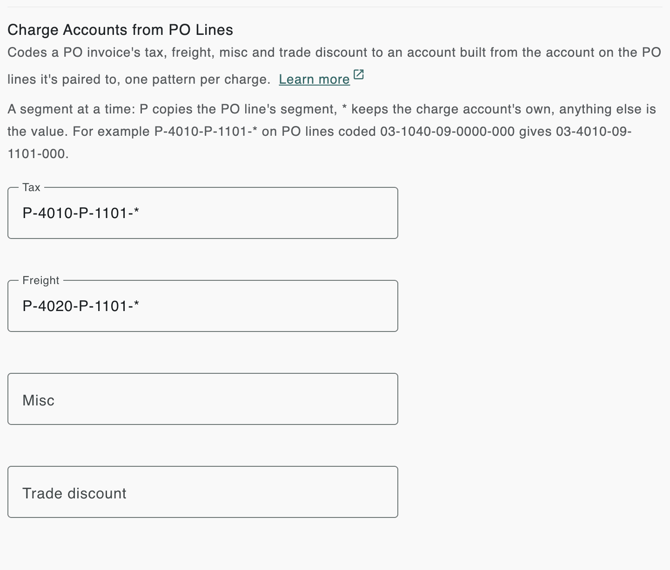
Leave a box blank to keep that charge on its usual account.
How a pattern works
A pattern has one entry per account segment, separated by hyphens, like your accounts:
- P copies that segment from the PO line's account.
- * keeps that segment of the charge's own account.
- Anything else is used as the segment's value.
The charge's own account is the one it would get anyway: the vendor's default account for that charge, or for freight and tax, the Freight Account or Sales Tax Account under Settings → Accounts Payable → MagiCapture. If there's none, the * segments come from the PO line's account.
A pattern can have up to 10 segments, of up to 20 characters each, and 66 characters in all. Spaces aren't allowed, and a lowercase p works the same as P.
Example: tax coded to the PO's trade and site
Your accounts are Trade-Natural-Site-Channel-Department, and the Tax pattern is P-4010-P-1101-*. An invoice's lines are on a PO whose lines are coded 03-1040-09-0000-000 (trade 03, site 09), and the vendor's default tax account is 01-4010-01-1001-000.
- Segment 1, P: 03, from the PO line.
- Segment 2, 4010: 4010.
- Segment 3, P: 09, from the PO line.
- Segment 4, 1101: 1101.
- Segment 5, *: 000, kept from the tax account.
The tax is coded to 03-4010-09-1101-000. Had the vendor's tax account been 01-4010-01-1001-777, the result would be 03-4010-09-1101-777.
Example: one pattern, different trades
With the same patterns, an electrical invoice whose PO lines are coded 02-1040-20-0000-000 has its tax coded to 02-4010-20-1101-000. A Freight pattern of P-4020-P-1101-* codes its freight to 02-4020-20-1101-000. One set of patterns covers every trade and site.
When the PO lines are on different accounts
Fidesic groups the invoice's lines by the segments the pattern copies, adds up each group's invoiced amount, and uses the group with the largest amount. If two groups tie, it picks the same one every time.
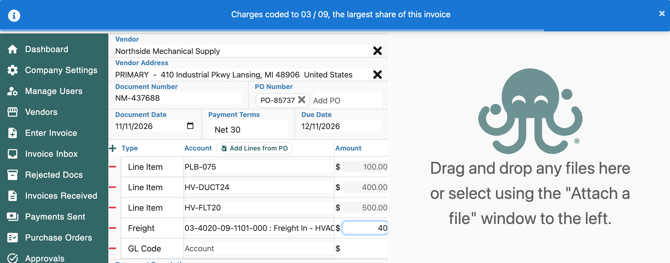
For example, with a Freight pattern of P-4020-P-1101-*, an invoice has one $100 line on 01-1040-09-0000-000, and $400 and $500 lines on 03-1040-09-0000-000. Trade 03, site 09 has $900 of the invoice, so the freight goes to 03-4020-09-1101-000. Fidesic says so with "Charges coded to 03 / 09, the largest share of this invoice": as a note on invoices MagiCapture captures, and as a message at the top of the screen when you add the charge yourself.
To code a charge differently, pick its account on the invoice yourself. Fidesic then leaves that row alone.
When it applies
Patterns apply to invoices whose lines are paired with PO lines, for example through Import Lines from PO. Lines that aren't on a PO, or PO lines without an account, don't count. The account is built:
- when MagiCapture captures a PO invoice;
- when you add a tax, freight, misc or trade discount row while entering or adjusting an invoice, or pick a tax detail on the tax row;
- when you save the invoice, so the charges follow any lines you added, removed or moved to another PO;
- when the PO is sent again from GP, or the invoice is re-checked against its PO, as long as no approver has acted on it yet.
Only charge rows Fidesic coded are changed. If someone picked a charge row's account themselves, it stays where they put it.
When the built account isn't in your chart of accounts
Fidesic only uses an account that is active in your chart of accounts. If the pattern builds one that isn't, the charge stays on its usual account, and a warning on the invoice names the account, for example "03-4020-09-1101-000 isn't in the chart of accounts". Add the account in GP so it syncs to Fidesic, or code the charge by hand.