![fidesic-logo-300px-2023-2.png]](https://help.fidesic.com/hs-fs/hubfs/fidesic-logo-300px-2023-2.png?height=40&name=fidesic-logo-300px-2023-2.png)
When something can't sync between Fidesic and QuickBooks Online, the rest of the sync carries on, and Fidesic tells you what didn't go and why. Once you fix the cause, the record goes through on the next sync. You don't have to undo or re-enter anything.
Where to see what didn't sync
The QuickBooks Online settings page
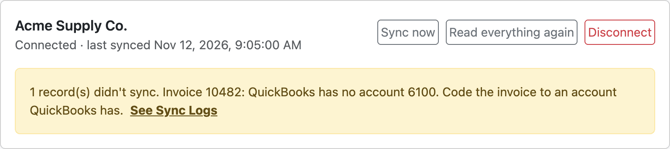
Settings → Integrations → QuickBooks Online shows a warning when the last sync had a problem, with the first one in full. Click See Sync Logs for the rest.
Sync Logs
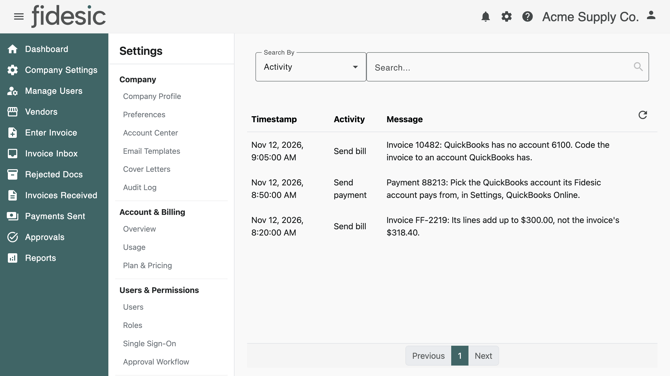
Settings → Integrations → Sync Logs lists each record that didn't sync, with when, what the sync was doing, and why. A record that keeps failing for the same reason is listed once, not on every sync.
Invoices to Accounting
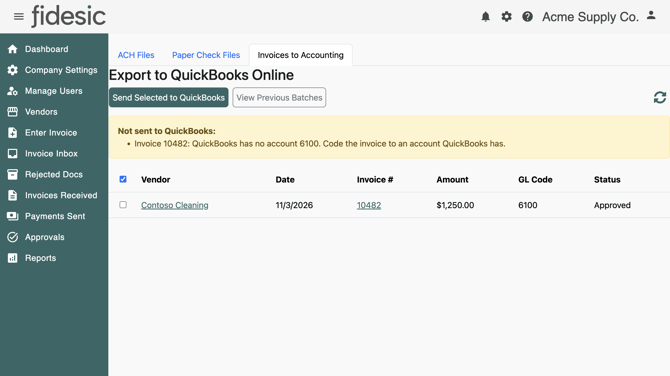
When you click Send Selected to QuickBooks, invoices that couldn't be sent stay on the list, with the reason for each above it.
Invoices
QuickBooks has no account 6100. Code the invoice to an account QuickBooks has.
The invoice is coded to a GL account that isn't in QuickBooks, or isn't one a bill can use. It may have been deleted or made inactive in QuickBooks, or added only in Fidesic. Either recode the invoice in Fidesic to an account QuickBooks has, or add the account in QuickBooks and click Sync now.
Its lines add up to $300.00, not the invoice's $318.40.
Its GL distribution doesn't add up to the invoice amount.
QuickBooks needs a bill's lines to add up to its total. Correct the invoice's GL distribution or lines in Fidesic so they match the invoice amount.
Line "…" has no account, and QuickBooks has no item ….
The line's item isn't in QuickBooks, and the line has no GL account to fall back on. Give the line a GL account, or add the item in QuickBooks.
It's in CAD; only US dollar invoices go to QuickBooks.
QuickBooks Online receives US dollar invoices only. Enter this invoice in QuickBooks yourself.
It isn't ready to send: it's not approved, or it was sent already.
Only invoices that have finished approval and haven't already gone to QuickBooks can be sent. Check the invoice's status. If it was sent already, it's in QuickBooks as a bill.
Payments
A payment isn't in QuickBooks yet
Payments are written to QuickBooks once they've gone out: paid, mailed or printed. Until then the Payments section of the settings page counts them as waiting, and shows when the next one goes. Payments from a Fidesic account set to None under Pay-from accounts aren't written at all.
Pick the QuickBooks account its Fidesic account pays from, in Settings, QuickBooks Online.
The payment's Fidesic account isn't matched to a QuickBooks bank account. Pick one under Pay-from accounts on the settings page.
Its QuickBooks pay-from account isn't a bank account.
The QuickBooks account matched to this Fidesic account has been changed to another type in QuickBooks. Pick a bank account under Pay-from accounts.
None of the invoices it paid are bills in QuickBooks.
The invoices this payment covers never went to QuickBooks, for example because they were paid before you connected. QuickBooks needs a bill to record a bill payment against, so record this payment in QuickBooks yourself.
The bill it paid is no longer in QuickBooks.
The bill was deleted in QuickBooks after Fidesic sent it. Record the payment in QuickBooks yourself.
Connecting
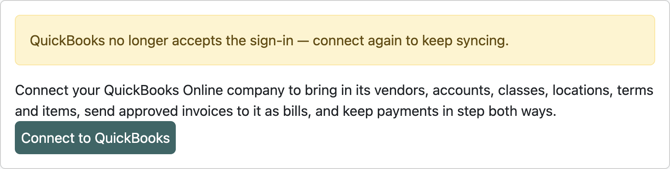
QuickBooks no longer accepts the sign-in — connect again to keep syncing.
QuickBooks has ended Fidesic's sign-in, for example because the app was disconnected from inside QuickBooks. Nothing syncs until you connect again. Click Connect to QuickBooks and sign in as an admin of the same company. The sync carries on where it left off.
QuickBooks wasn't connected: access was declined.
That QuickBooks sign-in didn't start from this page, so it wasn't used.
The sign-in was cancelled in QuickBooks, or it wasn't started from Fidesic's Connect to QuickBooks button. Start again from that button.
QuickBooks Online isn't set up for Fidesic yet, so it can't be connected.
Contact Fidesic support.
There's no QuickBooks Online in Settings
The page only appears when your company's accounting package is QuickBooks Online and you have the Manage Company Profile permission. Check Accounting Package under Settings → Company → Company Profile, and ask an admin about your permissions.
Something looks out of step
If a vendor, account or list in Fidesic doesn't match QuickBooks, click Read everything again on the settings page. The next sync, within a minute, reads every vendor, account and list from QuickBooks instead of only what changed.