![fidesic-logo-300px-2023-2.png]](https://help.fidesic.com/hs-fs/hubfs/fidesic-logo-300px-2023-2.png?height=40&name=fidesic-logo-300px-2023-2.png)
To create your Fidesic account, you will need to provide the following information on the signup page: Customer ID. This information will be available on an invoice from your vendor, and might be referred to as customer number, or franchise number. You may also be required to enter an invoice number. You'll also be required to enter an email address and password to use for logging in.
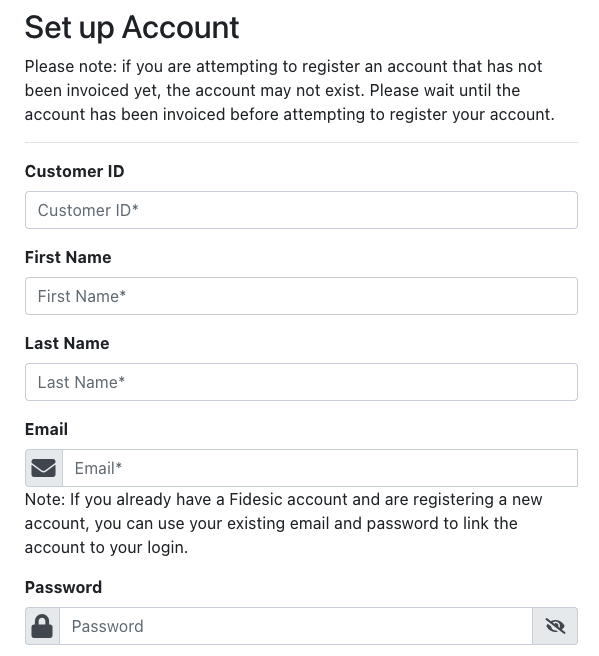
Accept the Terms and Conditions and click the "Sign Up" button. You will be directed back to the login page, where you will be able to log in using your newly created credentials. If this does not happen and you receive an error, check the guide below for help with your specific error.
The most common errors you may receive are:
- Invalid Customer ID
- The Customer ID that you entered does not match any in our system. We recommend checking to make sure it was typed correctly.
- If your account was recently invoiced for the first time, the vendor may not have transmitted the invoice record to our system yet. Your account will not appear in our system until it has been invoiced. We recommend waiting for a confirmation email from Fidesic before attempting to sign up again.
- The account associated with this Customer ID has already been registered by another email address
- Someone else has already registered this account with their own email address and password. If you know who registered the account, we recommend reaching out to them directly. If you are unsure, or if that person is no longer with your company, please contact Fidesic customer support for further assistance.
- Invoice not found
- The invoice number you entered does not match any record in our system. Please double-check that it was typed correctly.
- If you just received the invoice from the vendor, it is possible that they have not yet sent up a record of the invoice to our system. We recommend trying a different invoice number, or waiting until you receive an email from Fidesic regarding the invoice.
- Customer ID and Invoice Number do not match to the same account
- The Customer ID and invoice number that you entered do exist in our system, but the invoice may exist for a different customer. We recommend checking to make sure both fields were typed correctly.
- If both fields are correct, we would recommend reaching out to the vendor to confirm the invoice is on the correct account.