![fidesic-logo-300px-2023-2.png]](https://help.fidesic.com/hs-fs/hubfs/fidesic-logo-300px-2023-2.png?height=40&name=fidesic-logo-300px-2023-2.png)
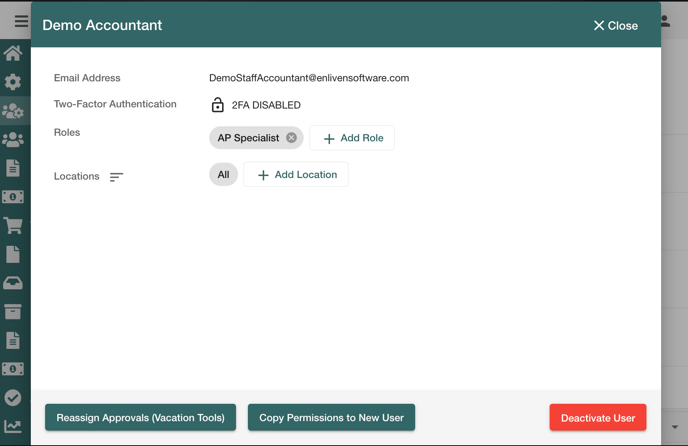
Navigate to the "Manage Users" page and click on the user you'd like to remove. This will open a window with a detailed view of the user's setup. At the bottom right of the window, there is a button labeled "Deactivate User". This will remove the user's access to Fidesic, and you will no longer be billed for them.
If the user approves invoices or payments
Fidesic checks the user's approvals before deactivating them:
- Pending approvals. If invoices or payments are waiting on the user's approval, deactivating is refused. Use Reassign Approvals (Vacation Tools) to move them to someone else first. See How to replace an approver.
- Rules where they are the only approver. If the user is the only active approver on a workflow rule, deactivating is refused, and Reassign opens the screen to move their rules to another user. A suspended co-approver doesn't count, because they can't approve.
- Rules with other approvers. If every rule the user is on has at least one other active approver, any one of whom can approve, Fidesic asks what to do:
- Remove & Deactivate takes the user off those rules and deactivates them. The other approvers on each rule carry on as before.
- Reassign opens Replace User as Approver with Replace Future Approvals ticked, so you can move their place on the rules to someone else.

If the user is an account owner
An account always keeps at least one owner. If the user is the account's only owner, deactivating is refused with "This user is the account's only owner. Make someone else an account owner first."
Reactivating a user
If you ever need to reactivate a user that was deactivated, from the "Manage Users" page select "Options > Inactive Users". This will load a list of any inactive users, with the option to reactivate the user on the right side of the screen. This will allow the user to log back in with the same email address and password they used at the time they were deactivated.
If the user is not sure of their password after having their account reactivated, they will need to reset their password.