![fidesic-logo-300px-2023-2.png]](https://help.fidesic.com/hs-fs/hubfs/fidesic-logo-300px-2023-2.png?height=40&name=fidesic-logo-300px-2023-2.png)
Fidesic sends invoice and payment emails from notifications@fidesic.com by default. To send them from your own address instead, such as billing@yourcompany.com, authenticate your email domain. Authenticating it gives Fidesic permission to send on your domain's behalf, so the emails aren't flagged as spam and your recipients see your company's address.
Fidesic only sends from your domain the emails you set up in your Fidesic account.
Authenticate your domain
- Go to Settings → Company → Company Profile and scroll to the Company Email section.
- Under Email Domain Authentication, enter your domain in Add a domain. That's the part of your email address after the @, such as yourcompany.com.
- Click Authenticate Domain. Fidesic lists the DNS records your domain needs, with the Type, Host / Name and Value / Points To of each. Click a host or value to copy it.
- Add those records in your domain's DNS settings. If you're not sure where those are, send the list to your IT team or whoever manages your domain.
- Back in Fidesic, click Verify DNS Records. Each record gets a check mark once Fidesic finds it, and the domain shows as Authenticated.
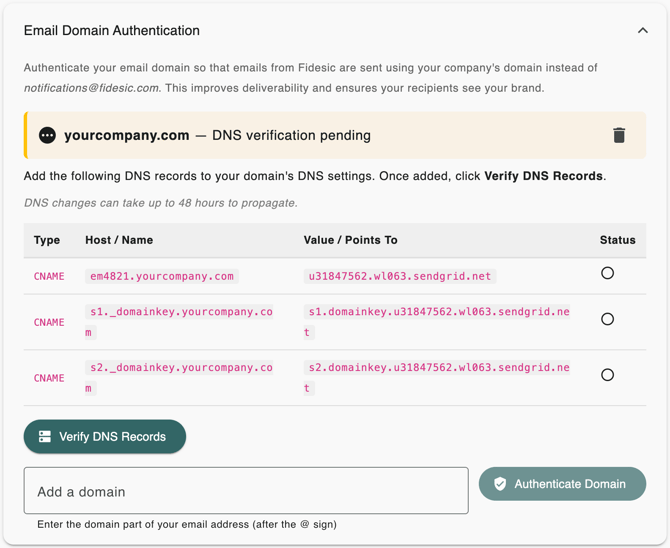
DNS changes can take up to 48 hours to take effect. If a record isn't found yet, wait and click Verify DNS Records again.
Choose the addresses that send your emails
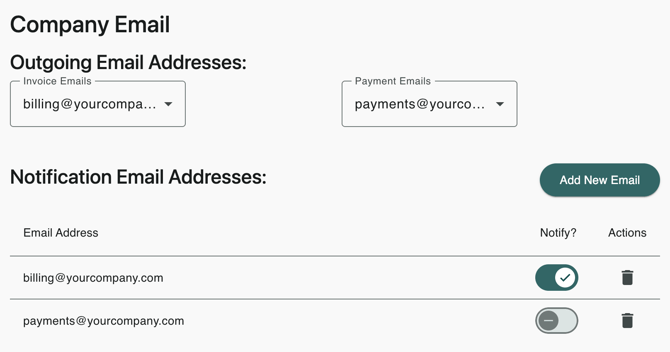
Once a domain is authenticated, the Notification Email Addresses list unlocks.
- Click Add New Email and enter an address on your authenticated domain.
- Use the Notify? toggle to choose whether that address also receives notifications.
- Under Outgoing Email Addresses, pick which address sends Invoice Emails and which sends Payment Emails.
Older setups that used an SPF record
Fidesic used to ask you to add an SPF record that allowed gty001.enlivensoftware.com to send for your domain. Domain authentication replaces that record: to send from your own addresses, authenticate your domain using the steps above.