![fidesic-logo-300px-2023-2.png]](https://help.fidesic.com/hs-fs/hubfs/fidesic-logo-300px-2023-2.png?height=40&name=fidesic-logo-300px-2023-2.png)
GP Vendor Sync keeps your vendors, accounts and purchase orders in step between Dynamics GP and Fidesic. Two settings in Fidesic control how often it runs and who is told when it needs attention.
Who can use this: users with Manage Company Profile, at companies on Dynamics GP.
Finding the settings
- Go to Settings → Company → Preferences.
- Open the GP Vendor Sync section. The top line shows the version of GP Vendor Sync you're running and when it last reported it.
A setting your version doesn't support is greyed out with "Needs GP Vendor Sync X or later". To update, see How to Update to the New Version of Fidesic Vendor Sync for GP.
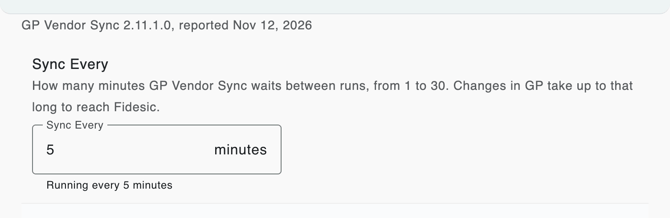
Sync Every
Sync Every is how many minutes GP Vendor Sync waits between runs, from 1 to 30. It starts at 1. A longer interval puts less load on your GP server, but changes made in GP take up to that long to reach Fidesic.
- Enter a whole number from 1 to 30.
- Click away from the box or press Enter to save. A number outside 1 to 30 is put back to the saved value.
Below the box, Running every N minutes shows the interval the sync is actually using. The sync picks up a change on its next run, so the two can differ for a cycle. If one GP Vendor Sync installation serves several companies, it runs at the shortest interval any of them sets.
This needs GP Vendor Sync 2.11.0 or later. Use 2.11.1 or later, which fixes changes made in the sync's Options window being lost while a sync was running.
Notification Emails
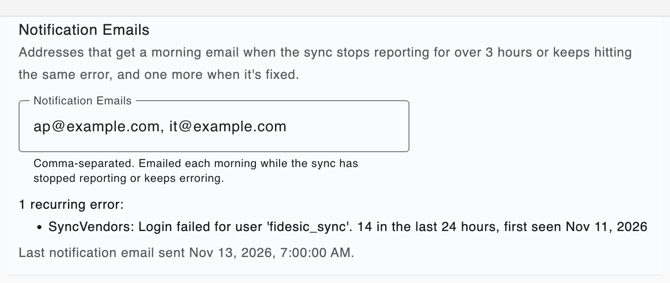
Enter the addresses that should hear about sync problems, separated by commas, up to 10. They save when you leave the box, and an address that isn't valid is refused with the reason. Clear the box to stop the emails.
Each morning at 7:00 AM Eastern, Fidesic emails these addresses, with a copy to Fidesic support, when:
- the sync has not reported for more than 3 hours. This can mean the service has stopped, or that it can't reach GP or Fidesic; or
- the sync keeps hitting the same error: on 2 of the last 3 days, or 10 or more times in 24 hours. A one-off error isn't reported.
While a problem lasts, you get at most one email a day about it. Once it's resolved, you get one more email saying the sync is reporting again.
Below the box, Fidesic shows what the next email would say: OK when the sync is reporting with no recurring errors, Not reporting with when it was last heard from, or each recurring error with how many times it happened in the last 24 hours and when it was first seen. It also shows when the last notification email went out.
This needs GP Vendor Sync 2.8.0 or later, the version that started reporting its status to Fidesic every hour.