![fidesic-logo-300px-2023-2.png]](https://help.fidesic.com/hs-fs/hubfs/fidesic-logo-300px-2023-2.png?height=40&name=fidesic-logo-300px-2023-2.png)
Some approvers have the final word. When a controller or owner signs off on an invoice, there's no reason for it to keep waiting on the stages after them. An Approve By rule can now fully approve the invoice as soon as its approver approves.
Who can use this: users with Edit Invoice Workflow. It applies to invoice workflow only, not payment workflow.
Setting it on a rule
- Go to Settings → Users & Permissions → Approval Workflow, on the Invoice tab.
- Click Add Rule in a stage, or Edit rule on an existing one.
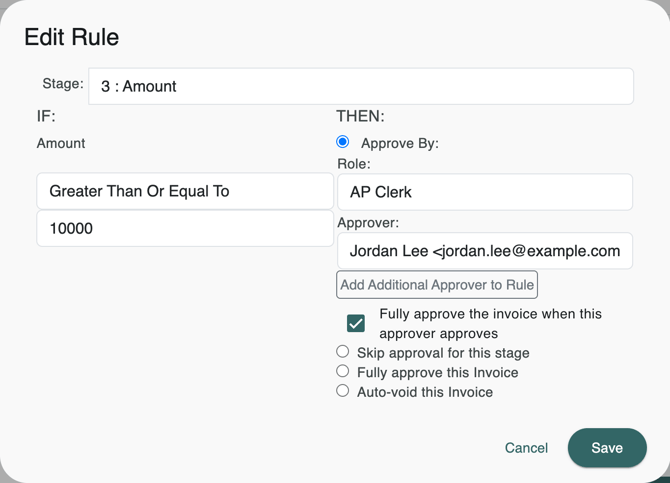
- Under THEN:, choose Approve By: and pick the approver.
- Tick Fully approve the invoice when this approver approves, and save the rule.
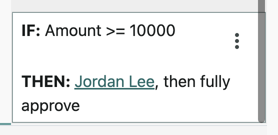
On the workflow page, the rule now reads , then fully approve after its approver, so you can see at a glance which rules end the workflow.
What happens when the approver approves
The invoice is fully approved straight away. Every other approval still waiting on it, in any stage, is ended, and the invoice's history records that this approver's rule fully approved it. Approvals already given stay as they were.
The rule works the same way if the approver also appears on another rule for the same invoice and Fidesic combines the two into one approval.
What doesn't change
- If the approver rejects the invoice, it's rejected as usual.
- If someone removes that approver from the invoice, it moves on to the next stage as it would without the setting.
- Rules that skip a stage, fully approve or auto-void work as before. The setting only appears on Approve By rules.
- Invoices already waiting on that approver don't need their workflow regenerated. The setting is checked when the approver approves, so it applies to them too.
Exporting your workflow keeps the setting, and importing a workflow that has it sets it again. See Fidesic Workflow Pt 2 for building a workflow.