![fidesic-logo-300px-2023-2.png]](https://help.fidesic.com/hs-fs/hubfs/fidesic-logo-300px-2023-2.png?height=40&name=fidesic-logo-300px-2023-2.png)
Fidesic's security and compliance information is in one place: the Fidesic Trust Center at trust.fidesic.com. Use it when your auditors, IT team or vendor-risk process asks for our SOC report or details about how we protect your data.
Anyone can open the Trust Center. The SOC 2 report and the security summaries are locked, so you request access to read them.
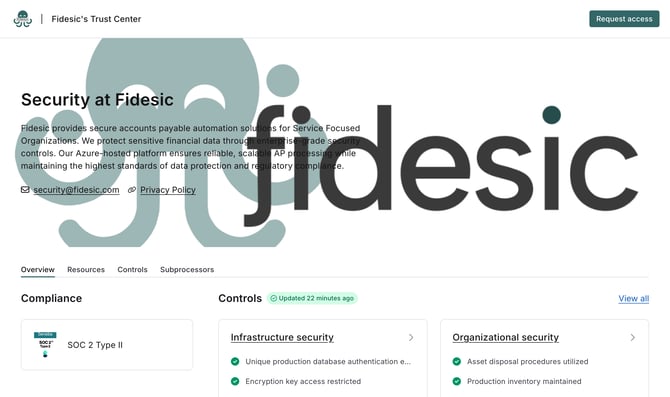
What's in the Trust Center
The page has four tabs: Overview, Resources, Controls and Subprocessors.
- Compliance: Fidesic has a SOC 2 Type II report.
- Resources: the SOC 2 Type II report itself, plus summaries of our policies: Cryptography, Access Control, Information Security, Business Continuity, Data Management, Third Party Management, Secure Development and Incident Response. Documents with a lock icon need approved access.
- Controls: the security controls we monitor, grouped into Infrastructure security, Organizational security, Product security, Internal security procedures, and Data and privacy. These are checked continuously, and the page shows when they were last updated.
- Subprocessors: the third-party services that support Fidesic, such as Microsoft Azure, which hosts the Fidesic platform.
Request access to the SOC 2 report
- Go to trust.fidesic.com.
- Click Request access in the top right, or click a locked document under Resources.
- Enter your First name, Last name, Email and Company name. Use your work email address.
- Choose a Reason.
- Under Resources, pick an Access level:
- Full access asks for every document.
- Limited access asks only for the documents you choose under Select resources, such as the SOC 2 Type II report.
- Click Request access.
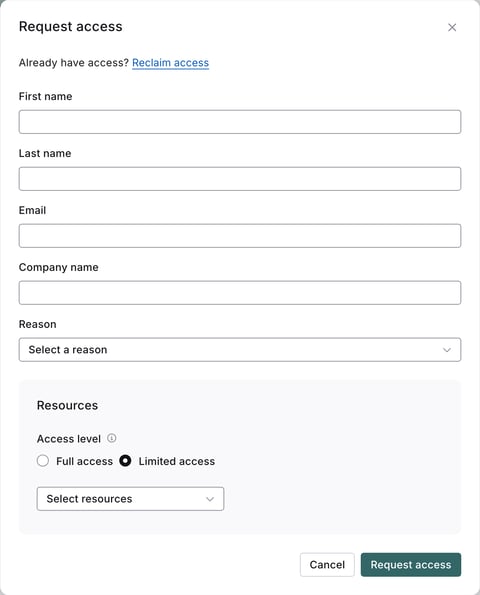
Already have access? Click Reclaim access at the top of the form instead of filling it in.
Security questionnaires and other questions
If your team has a security questionnaire, or a question the Trust Center doesn't answer, email security@fidesic.com. Our privacy policy is linked at the top of the Trust Center.