![fidesic-logo-300px-2023-2.png]](https://help.fidesic.com/hs-fs/hubfs/fidesic-logo-300px-2023-2.png?height=40&name=fidesic-logo-300px-2023-2.png)
Accessing the Audit Log
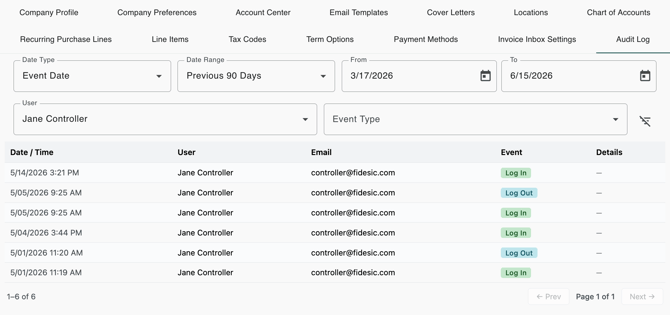
Go to Settings → Company → Audit Log
Please note: this page requires the Manage Users permission.
What the Audit Log Records
Session & Security Events
These events track how users access the system and manage their credentials.
|
Event |
Description |
|---|---|
|
Log In |
Successful user login |
|
Log Out |
User explicitly logged out |
|
Session Timeout |
Session expired due to inactivity |
|
Password Set |
Password was set for the first time for a new user |
|
Password Changed |
User changed their own password |
|
Password Reset |
Password was reset via the Forgot Password flow |
|
2FA Enabled |
A user enabled 2FA on their account |
|
2FA Disabled |
A user disabled 2FA on their account |
|
Login Attempts Reset |
A locked account’s login attempt counter was reset by an admin |
|
API Key Created/Revoked |
A company API key was created or revoked |
|
SSO Settings Changed |
The single sign-on settings were saved |
|
SSO Sign-In Refused |
A single sign-on attempt was refused; Details gives the reason |
|
SSO Add-On Started/Stopped |
The single sign-on add-on was turned on or off for the account |
Workflow & Banking Events
These events capture changes to the financial and procedural structure of the account.
|
Event |
Description |
|---|---|
|
Workflow Rule Created |
A new approval workflow rule was added |
|
Workflow Rule Updated |
An existing workflow rule was modified |
|
Bank Account Added |
A new company bank account was added |
|
Bank Account Updated |
An existing company bank account was modified |
|
PGP/RSA Key Actions |
Adding, removing, or transmitting encryption keys to the bank |
|
FTP Setup Actions |
Saving or removing SFTP connection settings |
|
Positive Pay Config |
Configuration and generation of Positive Pay settings and keys |
|
Vendor Bank Added/Changed |
Changes to vendor bank records and user acknowledgments of those changes |
|
Workflow Rule Deleted |
An approval workflow rule was removed |
|
Workflow Imported |
An approval workflow was imported; Details lists how many stages and rules it brought in |
|
Bank Account Removed |
A company bank account was removed |
|
Default Account Changed |
A different company bank account was made the default |
|
Vendor Address Change Acknowledged |
A user acknowledged a change to a vendor’s address |
|
Vendor Prenote Returned |
The bank returned a vendor’s prenote; Details gives the return code |
Roles & User Management
These events track modifications to user access and organizational hierarchies.
|
Event |
Description |
|---|---|
|
Role Created/Updated/Deleted |
Changes to role definitions and permissions |
|
User Added/Deactivated/Reactivated |
Changes to user account status |
|
User Role Added/Removed |
A role was added to or removed from a user |
|
Location/Dimension Changes |
Assigning or removing location and dimension filters for users |
|
Account Owner Added/Removed |
A user was made an account owner, or stopped being one |
|
User Added to Or Approvers List |
A user was added to another user's Or approvers, so they can approve invoices routed to that user |
|
User Removed from Or Approvers List |
A user was removed from another user's Or approvers |
|
View As Started/Ended |
An administrator started or stopped viewing Fidesic as another user; Details names that user |
Company, Vacation & Customer Events
These events track account-wide settings, vacation stand-ins and customer transfers.
|
Event |
Description |
|---|---|
|
Company Property Changed |
A company setting was changed; Details names the setting |
|
Company Settings Copied |
Settings were copied into this account from another company; Details lists what was copied |
|
Vacation Rule Created/Cancelled |
A vacation stand-in was set up or cancelled |
|
Customer Transferred |
A customer was moved between company accounts |
Payment File Events
These events record who asked Fidesic to generate a payment file from Settings → Export Files. Every click is recorded, including ones Fidesic couldn't carry out. The Details column shows the result: Requested, or the reason no file was generated (for example, no checks were due).
|
Event |
Description |
|---|---|
|
ACH File Generated |
Someone clicked Generate File Now on the ACH Files list |
|
Check File Generated |
Someone clicked Generate File Now on the Paper Check Files list |
|
Test Check File Generated |
Someone clicked Generate Test Check File |
|
Offline Positive Pay Generated |
Someone clicked Generate And Send Positive Pay Files for Offline Payments |
Filtering the Log
Administrators can narrow the Audit Log results using several filter controls:
- User: Filter by selecting a specific user name from the dropdown.
- Date Range: Use "From Date" and "To Date" to restrict results to a specific timeframe.
- Event Type: Pick one or more event types. They're grouped the same way as the tables above.
- Clear Filters: The button next to the filters resets them and shows every event again.
Reading the Log
Each row shows the Date / Time of the event, the User and Email it applies to, the Event, and Details such as the setting, rule or result involved. Details is blank when the event has nothing to add.
Exporting the Log to Excel
Click the Export to Excel button above the log to download the entries as a spreadsheet. The export uses the same filters as the table, so filter first to export only what you need.

Common Use Cases
The Audit Log is designed to support various organizational needs:
- Security Review: Check login activity for specific users or time periods.
- Offboarding: Verify a departing employee's last login and confirm account deactivation.
- Compliance: Demonstrate that role and workflow changes are attributable to specific administrators.
- Banking Verification: Confirm when vendor bank accounts were modified or acknowledged before a payment run.
Important Note: Invoice/Payment-Level Actions
One invoice action is recorded here: Invoice Saved Without Reset, written each time someone changes an existing invoice without resetting its approvals, including changes made through the API. Use it to review who has been using the Adjust Without Reset permission.
Otherwise, the Audit Log does NOT track invoice or payment-level actions such as approvals, edits, or voids. These specific actions are recorded in the History tab of the individual document. For a full history of actions related to a specific invoice or payment, please open the record directly.