![fidesic-logo-300px-2023-2.png]](https://help.fidesic.com/hs-fs/hubfs/fidesic-logo-300px-2023-2.png?height=40&name=fidesic-logo-300px-2023-2.png)
Accessing the Audit Log
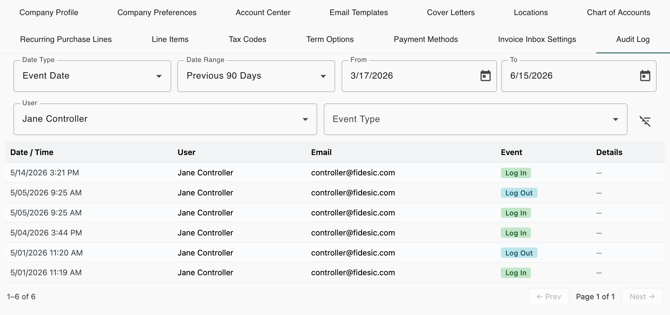
Go to Company Settings → Audit Log
Please note: this page requires the Manage Delegates permission.
What the Audit Log Records
Session & Security Events
These events track how users access the system and manage their credentials.
|
Event |
Description |
|---|---|
|
Log In |
Successful user login |
|
Log Out |
User explicitly logged out |
|
Session Timeout |
Session expired due to inactivity |
|
Password Set |
Password was set for the first time for a new user |
|
Password Changed |
User changed their own password |
|
Password Reset |
Password was reset via the Forgot Password flow |
|
Two-Factor Auth Enabled |
A user enabled 2FA on their account |
|
Two-Factor Auth Disabled |
A user disabled 2FA on their account |
|
Login Attempts Reset |
A locked account’s login attempt counter was reset by an admin |
Workflow & Banking Events
These events capture changes to the financial and procedural structure of the account.
|
Event |
Description |
|---|---|
|
Workflow Rule Created |
A new approval workflow rule was added |
|
Workflow Rule Updated |
An existing workflow rule was modified |
|
Bank Account Added |
A new company bank account was added |
|
Bank Account Updated |
An existing company bank account was modified |
|
PGP/RSA Key Actions |
Adding, removing, or transmitting encryption keys to the bank |
|
FTP Setup Actions |
Saving or removing SFTP connection settings |
|
Positive Pay Config |
Configuration and generation of Positive Pay settings and keys |
|
Vendor Bank Added/Changed |
Changes to vendor bank records and user acknowledgments of those changes |
Roles & User Management
These events track modifications to user access and organizational hierarchies.
|
Event |
Description |
|---|---|
|
Role Created/Updated/Deleted |
Changes to role definitions and permissions |
|
User Added/Deactivated |
Changes to user account status |
|
User Role Assigned |
A role was added to or removed from a user |
|
Location/Dimension Changes |
Assigning or removing location and dimension filters for users |
Filtering the Log
Administrators can narrow the Audit Log results using several filter controls:
- User: Filter by selecting a specific user name from the dropdown.
- Date Range: Use "From Date" and "To Date" to restrict results to a specific timeframe.
- Event Type: Filter results by a specific event category.
Common Use Cases
The Audit Log is designed to support various organizational needs:
- Security Review: Check login activity for specific users or time periods.
- Offboarding: Verify a departing employee's last login and confirm account deactivation.
- Compliance: Demonstrate that role and workflow changes are attributable to specific administrators.
- Banking Verification: Confirm when vendor bank accounts were modified or acknowledged before a payment run.
Important Note: Invoice/Payment-Level Actions
The Audit Log does NOT track invoice or payment-level actions such as approvals, edits, or voids. These specific actions are recorded in the History tab of the individual document. For a full history of actions related to a specific invoice or payment, please open the record directly.